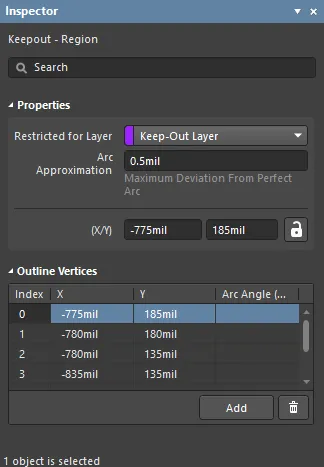
Properties
- Restricted Layer - this field displays the restricted layer to which the keepout is currently assigned. To change the layer, click the field and select a layer from the drop-down list.
- Arc Approximation - enter the maximum deviation from a perfect arc.
- (X/Y)
The lock icon to the right of this region must be displayed as unlocked in order to access the below fields. Toggle the lock/unlock icon to change its lock status.
- X (first field) - the current X (horizontal) coordinate of the reference point of the keepout, relative to the current design space origin. Edit to change the X position of the keepout. The value can be entered in either metric or imperial; include the units when entering a value whose units are not the current default.
- Y (second field) - The current Y (vertical) coordinate of the reference point of the keepout, relative to the current origin. Edit to change the Y position of the keepout. The value can be entered in either metric or imperial; include the units when entering a value whose units are not the current default.
Outline Vertices
This region is used to modify the individual vertices of the currently selected object. You can modify the locations of existing vertices, add new vertices or remove them as required. Arc connections between vertex points can be defined, and support is also provided for exporting vertex information to and importing from a CSV-formatted file.
- Vertices Grid - lists all of the vertex points currently defined for the region in terms of:
- Index - the assigned index of the vertex (non-editable).
- X - the X (horizontal) coordinate for the vertex. Click to edit.
- Y - the Y (vertical) coordinate for the vertex. Click to edit.
- Arc Angle (Neg = CW) - the angle of an arc that is drawn to connect this vertex point to the next. By default, connections are straight-line edges, with this field remaining blank. Click to edit then enter an arc angle as required. Entry of a positive value will result in an arc drawn counterclockwise. To draw a clockwise arc, enter a negative value.
Straight-line edges are used to connect one vertex point to the next. If you would rather have an arc connection, enter a value for the required Arc Angle. Entry is made in the field associated to the source vertex point, with the arc being from this vertex to the subsequent vertex below in the list.
- Add - click to add a new vertex point. The new vertex will be added below the currently focused vertex entry and will initially have the same X,Y coordinates as the focused entry. Click
 to remove the currently selected vertex.
